
A quality gimbal ensures steady handheld footage and smooth panning for Android smartphone videography.
Imagine you’re at your friend’s birthday party and only have a few minutes to capture the perfect video before the cake is cut. With shaky hands or quick movements, it’s easy for your footage to turn out blurry or unprofessional.
That’s where using a quality gimbal for your Android phone comes in—it keeps your videos smooth and stable, even when you’re on the move. Up next, I’ll share some expert recommendations to help you find the right fit for your filming needs.
What Expert Picks For Best Gimbal For Android Video
Dji Osmo Mobile 8 Gimbal For Android
Looking for the Best Gimbal for Android Video? The Osmo Mobile 8 stands out for its 3-axis stabilization and versatile features for smooth filming.

The DJI Osmo Mobile 8 is a compact, foldable gimbal designed for smartphones, especially Android devices. It offers 3-axis stabilization, intelligent subject tracking, and built-in features like audio reception and lighting, making it a solid pick for content creators who want stable, professional-looking video without extra gear.
In everyday use, the Osmo Mobile 8 feels intuitive and comfortable—even during longer shoots. The grip is easy on your wrist, and the built-in tripod and extension rod simplify hands-free and group shots. Setting up is quick, and tracking works reliably, so you can focus on your footage instead of fussing with settings.
Pros:
- Excellent 3-axis stabilization for smooth video
- Native audio and lighting integration for improved quality
- 360° pan rotation enables creative shots
- Quick phone connection and intuitive tracking
- Portable, foldable design for easy transport
- Built-in tripod and extension rod—no extra accessories needed
- Ultra-comfortable grip for longer filming sessions
Cons:
- May be bulky for very small purses or pockets
- Learning curve for advanced tracking features
- Lighting function could be limited in harsh outdoor conditions
My Honest Take
This gimbal suits anyone who wants steady, professional video with minimal fuss—whether you’re a beginner or seasoned vlogger. Setup is straightforward, and you don’t need extra gear for group shots or hands-free filming. If you’re new to gimbals, the intuitive controls make it easy to get started, while experienced users will appreciate the creative flexibility.
My tip: take a few minutes to explore the tracking and lighting features before your first shoot—they’re worth it. The built-in tripod is handy for low-angle shots or filming pets and kids. Overall, you get peace of mind knowing your videos will come out smooth and clear every time.
If you want a reliable gimbal for Android video that’s easy to use and versatile, this is a smart choice.
| Best for | Why |
|---|---|
| Beginner video creators | Easy setup and intuitive controls |
| Vloggers and influencers | Smooth stabilization and creative filming options |
| Family and travel use | Built-in tripod and extension rod for group shots |
| Pet and action filming | Low-angle shooting and reliable subject tracking |
Hohem Isteady X3 Se Gimbal
A top pick for Best Gimbal for Android Video thanks to its portability and reliable stabilization features.
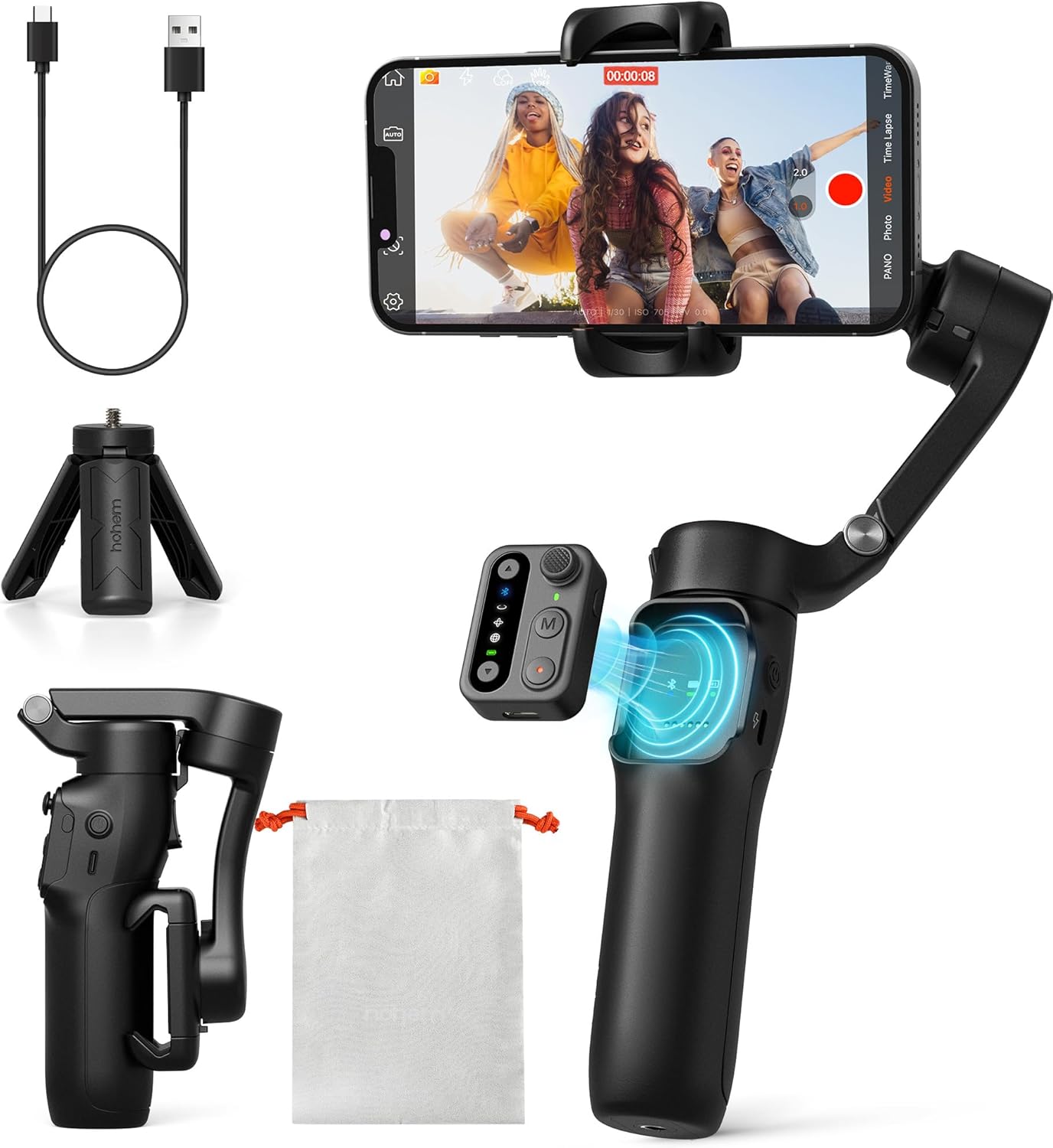
The Hohem iSteady X3 SE is a lightweight, foldable 3-axis gimbal designed for both Android and iPhone users. It comes with a detachable remote controller, letting you capture group shots or solo videos from a distance. With advanced stabilization tech and seamless app integration, it’s a solid choice for anyone wanting smoother, more professional-looking smartphone footage without carrying bulky gear.
In daily use, this gimbal stands out for its portability and ease of setup. It folds down small enough to fit in a jacket pocket, and the intuitive controls mean you don’t need a learning curve to get started. The battery life is impressive, easily lasting a full day of casual shooting, so you don’t have to stress about frequent recharging. I found the remote especially handy for quick selfies and vlogging on the go.
Pros:
- Detachable magnetic remote for hands-free operation
- Remarkably lightweight and pocket-friendly
- Stable footage, even during active movement
- Easy app integration with creative shooting modes
- Long 11-hour battery life for uninterrupted shoots
- Simple setup, good for beginners and casual users
Cons:
- Remote range is limited to about 33 feet
- Not as robust as some pro-level gimbals for heavy rigs
- Best features require using the Hohem Joy app
My Honest Take
If you’re looking for a gimbal that’s easy to carry and quick to set up, the Hohem iSteady X3 SE is a smart option—especially for Android users wanting stable video without a steep learning curve. This model is welcoming for beginners, with thoughtful features like the detachable remote and straightforward app interface. Experienced users might wish for more manual controls, but for most people, it covers all the basics and a bit more.
After you buy, you’ll appreciate how little space it takes in your bag and that you can shoot all day without battery anxiety. If you’re new to gimbals, spend a few minutes with the app’s tutorials—the gesture and tracking features are worth exploring. For travel, vlogging, or family events, I’d confidently pack this before anything heavier or more complicated.
| Best for | Why |
|---|---|
| Travelers & Vloggers | Ultra-portable, fits in a pocket, and supports all-day shooting |
| Beginner Filmmakers | User-friendly controls and app; no steep learning curve |
| Group & Solo Shooters | Detachable remote lets you control shots from a distance |
| Everyday Content Creators | Reliable stabilization and creative modes for varied shooting needs |
Dji Osmo Mobile 7p Gimbal Stabilizer
A top contender for Best Gimbal for Android Video if you need simple, reliable stabilization and creative features in one compact package.

The DJI Osmo Mobile 7P Gimbal Stabilizer is designed for anyone who wants smooth, professional-looking video with their Android or iPhone. It combines intelligent tracking, built-in mic and lighting options, and a robust 3-axis stabilization system—all in a lightweight, easy-to-carry frame. With the DJI Mimo app, you can access quick guides and one-tap editing tools that make the transition from shooting to sharing nearly seamless.
In everyday use, the Osmo Mobile 7P stands out for its hassle-free setup: just unfold, snap in your phone magnetically, and start filming. The automatic app pop-up is a subtle touch that saves time, while the built-in extension rod and tripod allow for flexible angles or stable selfies without extra gear. It feels straightforward enough for beginners but has a feature set that satisfies those who want a little more creative control.
Pros:
- Effortless, reliable 3-axis stabilization even for fast movements
- Intelligent subject tracking for hands-free shooting
- Magnetic phone mount for quick setup
- Built-in extension rod and tripod for versatile angles
- Integrated mic and lighting support for improved audio/video
- One-tap editing and ShotGuides in the Mimo app
Cons:
- Requires DJI Mimo app for full functionality
- Some advanced features may take time to learn
- Not the most compact when folded for small bags
My Honest Take
This gimbal is best for creators who want easy, high-quality stabilization without the fuss of complicated gear. Both beginners and more experienced shooters will appreciate how quickly they can get started, and the built-in extension rod means you can travel lighter.
If you’re just starting out, take advantage of the app’s ShotGuides—they really help you get professional-looking results fast. For peace of mind, the magnetic mount feels secure and reliable. Personally, I like how it covers all the basics without overwhelming you with options.
| Best for | Why |
|---|---|
| Beginner videographers | Intuitive setup and app guides make learning easy |
| Mobile content creators | Quick setup, built-in tripod, and native tracking features |
| On-the-go vloggers | No extra gear needed for steady shots and wide angles |
| Anyone wanting simple stabilization | Reliable performance without a steep learning curve |
Dji Osmo Mobile 7 Gimbal For Android
This is our pick for Best Gimbal for Android Video thanks to its consistent stabilization and effortless setup for mobile creators.

The DJI Osmo Mobile 7 is a lightweight, foldable gimbal stabilizer designed for Android and iPhone users. It offers 3-axis stabilization, a built-in tripod, and advanced tracking features that help you capture smooth, steady video even if you’re on the move. Pairing with the DJI Mimo app unlocks easy editing tools and creative shooting modes, making this gimbal a solid companion for anyone looking to step up their mobile video game.
In everyday use, the Osmo Mobile 7 feels comfortable and intuitive, thanks to its ergonomic design and anti-slip grip. The gimbal’s quick setup and reliable stabilization mean you can focus more on your shot and less on setup hassles. It’s especially handy for vlogging, travel, or capturing moments solo, as the built-in tripod and tracking features handle movement smoothly. I found it easy to keep subjects in focus, and editing was a breeze with the app’s one-tap tools.
Pros:
- Consistent 3-axis stabilization for smooth video
- Foldable design with built-in tripod for easy portability
- ActiveTrack 7.0 for reliable subject tracking
- Lightweight and comfortable for extended use
- Quick pairing and editing via DJI Mimo app
- Simple setup, even for beginners
Cons:
- Requires app for advanced features
- Plastic build may not suit rough outdoor use
- May be too small for larger phones with heavy cases
My Recommendation
This gimbal is ideal for anyone wanting stable, professional-looking video from their Android phone without fuss. Whether you’re just starting or already comfortable shooting mobile video, the Osmo Mobile 7 makes the transition easy and stress-free. The foldable design and light weight mean you can take it anywhere, and the built-in tripod is a lifesaver for solo creators.
Beginners will appreciate the simple setup and ShotGuides, while experienced users can take advantage of the advanced tracking and editing tools. My tip: always charge before heading out, and practice with ActiveTrack for best results. Overall, it’s a reliable choice that gives peace of mind knowing your footage stays steady.
| Best for | Why |
|---|---|
| Mobile video creators | Offers reliable stabilization and quick editing |
| Travel vloggers | Lightweight and portable for on-the-go shooting |
| Solo content makers | Built-in tripod and tracking for easy self-filming |
| Beginner videographers | Simple setup and guides for fast learning |
Aochuan Smart Xe Foldable Phone Gimbal
If you’re searching for the Best Gimbal for Android Video, this compact stabilizer stands out for its smooth, portable design and easy video controls.

The AOCHUAN Smart XE Foldable Phone Gimbal is a lightweight, three-axis stabilizer designed for both Android and iPhone users. With its foldable design and intuitive controls, it’s well-suited to anyone who wants better, smoother videos for vlogging, TikTok, or everyday capturing without dealing with bulky equipment or a steep learning curve. The built-in focus wheel, zoom slide, and one-click mode switching make it especially friendly for creators who want versatility in their shooting style.
In daily use, this gimbal feels reliable and easy to handle. The 10-hour battery keeps you going through longer recording sessions, and the compact size slips into most bags or even a large pocket. Switching between portrait and landscape is quick, and the app’s AI Face Track makes following subjects a breeze, even for beginners. Overall, it just gets out of your way and lets you focus on the content.
Pros:
- Compact, foldable, and lightweight for travel or daily carry
- One-click switch between vertical and horizontal video modes
- Strong stabilization with advanced anti-shake algorithm
- Works with most Android and iPhone models
- Easy-to-use focus wheel and zoom slide
- Long battery life (up to 10 hours)
- App-based AI tracking and creative shooting modes
Cons:
- Some features require using the AOCHUAN app
- Not ideal for phones over 250g in weight
- No included carrying case
My Honest Take
This gimbal is a great choice for casual creators, travel vloggers, or anyone who wants to step up their smartphone video quality without a lot of fuss. Beginners will appreciate the simple controls and the intuitive app, while experienced users can take advantage of the creative modes and focus/zoom adjustments. You won’t have to worry about battery life during the day, and setup is quick—just pop in your phone and go.
If you’re just starting out, my tip is to try the one-click video mode switch and let the AI face tracking do the work, especially for dynamic scenes. For everyday video, the stabilization really makes a difference, and it’s nice knowing your footage will look smooth even on the move. I’d reach for this when I want reliable, steady video without carrying a big rig.
| Best for | Why |
|---|---|
| Beginner videographers | Simple controls, AI tracking, and app tutorials make it easy to start |
| Travel vloggers | Foldable, lightweight design fits in a bag and lasts all day |
| TikTok and YouTube creators | Quick mode switching and vertical video support for social platforms |
| Anyone needing smooth video | Strong stabilization for walking, action, or family moments |
Hohem Isteady V3 Ultra Gimbal
A smart pick for anyone seeking the Best Gimbal for Android Video thanks to its AI tracking and remote control features.
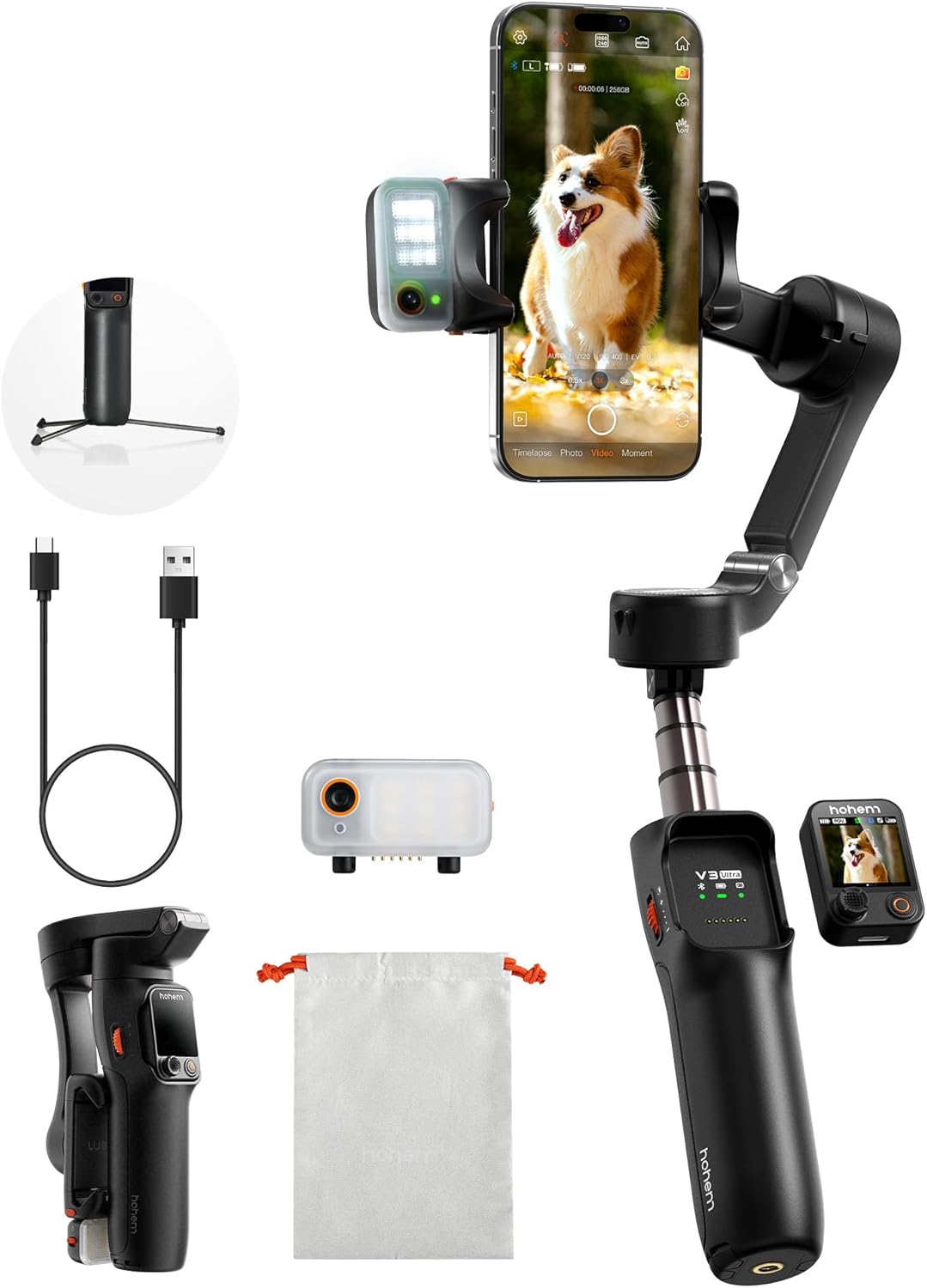
The Hohem iSteady V3 Ultra is a 3-axis gimbal stabilizer designed for both Android and iPhone users who want their mobile video to look smooth and professional. It stands out by offering advanced AI tracking that follows faces, pets, or objects, and a detachable touchscreen remote for effortless control up to 33 feet away. With an extendable selfie stick, built-in tripod, and customizable fill light, it delivers flexibility for everything from vlogs to family videos.
In real-world use, this gimbal brings a lot of value to daily shooting. The stabilization is consistently reliable, whether you’re walking, running, or filming energetic kids or pets. The remote control and AI tracking simplify solo filming, letting you focus more on your subject and less on technical setup. Adjusting lighting or angles is quick, making it beginner-friendly but still robust enough for experienced content creators.
Pros:
- AI tracking for faces, pets, and objects—keeps subjects in frame automatically
- Detachable remote with touchscreen for easy solo shooting
- 3-axis stabilization delivers smooth, shake-free footage
- Extendable selfie stick and tripod for versatile shooting angles
- Built-in fill light with adjustable brightness and color temperature
- Remote operation up to 33 feet away—no need to touch your phone
Cons:
- Learning curve for advanced features if you’re brand new to gimbals
- Bulkier than some entry-level, basic stabilizers
- Battery life may decrease with frequent use of fill light and remote
My Honest Take
If you’re a solo creator, parent, or anyone who films a lot of action with your Android phone, the Hohem iSteady V3 Ultra makes life easier from day one. Its AI tracking and remote let you record without needing an extra set of hands, while the stabilization helps even amateurs shoot impressive, steady clips. Most beginners will quickly get comfortable with the basics, while more advanced users will appreciate the creative options.
After purchase, take a few minutes to get familiar with the remote and tracking modes—it’s worth it. The fill light is handy for evening or indoor shoots, giving you one less thing to worry about. Personally, I like that this gimbal lets me set up anywhere and trust my phone will keep up with the action.
| Best for | Why |
|---|---|
| Solo content creators | Hands-free control and reliable tracking simplify self-filming. |
| Pet owners & parents | AI tracking keeps fast-moving subjects in frame. |
| Livestreamers & vloggers | Built-in fill light and stable footage for professional-looking videos. |
| Travelers & adventurers | Portable, with extension rod and tripod for creative angles on the go. |
Dji Osmo Mobile 7p Gimbal Stabilizer
A top choice for Best Gimbal for Android Video, offering seamless stability and creative control for every shoot.

The DJI Osmo Mobile 7P Gimbal Stabilizer is a portable, easy-to-use tool designed to help you shoot smooth, professional-quality videos with your Android phone. It comes bundled with the Mic Mini TX, offering both stabilization and clear audio capture in one kit. With features like intelligent tracking and an integrated extension rod, it’s built for creators who want to step up their mobile video game without extra fuss.
In everyday use, the Osmo Mobile 7P stands out for how quickly you can set it up and start recording. The magnetic phone mount and automatic app launch mean you won’t miss a moment, even if you’re shooting on the go. Whether you’re vlogging, capturing family moments, or filming creative projects, the gimbal’s consistent stabilization and built-in tripod make it easy to get reliable, steady shots every time.
Pros:
- Excellent 3-axis stabilization for smooth, shake-free video
- Magnetic phone mount makes setup quick and easy
- Includes a compact microphone for improved audio
- Built-in extension rod and tripod for versatile shooting angles
- Smart tracking features simplify capturing moving subjects
- One-tap editing with DJI Mimo app for fast workflow
Cons:
- Best features require using the DJI Mimo app
- Not ideal for phones with bulky cases
- Extension rod length may be limiting for some wide shots
Who Should Choose This
If you’re looking for an easy transition from handheld shooting to smooth, cinematic video, the Osmo Mobile 7P is a strong fit. Beginners will appreciate the straightforward setup and guided edits, while more experienced users can take advantage of advanced tracking and audio features. It’s especially practical for content creators who want to travel light or film on the move.
One tip: keep your phone case slim for best magnetic mounting. The peace of mind from having built-in audio and stabilization is real—you can focus on your story, not your gear. I’d reach for this if I wanted a reliable, all-in-one solution for everyday video.
| Best for | Why |
|---|---|
| Mobile content creators | Quick setup and quality stabilization for shooting on the go |
| Beginner videographers | Simple operation with helpful app guidance |
| Vloggers and travelers | Built-in mic and tripod make it versatile for all environments |
| Anyone needing reliable Android video stabilization | Consistent results without a steep learning curve |
Hohem Isteady M7 Gimbal For Android
For those seeking the Best Gimbal for Android Video, the Hohem iSteady M7 stands out for its pro-level stabilization and innovative tracking features.

The Hohem iSteady M7 is a 3-axis gimbal stabilizer designed for Android (and iPhone) users who want to shoot smooth, cinematic video. Its standout features include a detachable touchscreen controller for remote operation, advanced AI subject tracking, and a stabilization system that keeps footage steady even during fast movements. The extendable aluminum rod is a nice touch for creative angles, and the long battery life means you can film all day without interruption.
In day-to-day use, the iSteady M7 feels reliable and straightforward, even if you’re new to gimbals. The magnetic AI tracker keeps your subject centered—great if you’re filming yourself or moving subjects. The battery easily lasts through long shoots, and having reverse charging is a relief when your phone is running low. I found setup simple, and the controls intuitive, so you can focus more on shooting than fiddling with settings.
Pros:
- Detachable touchscreen controller for remote operation up to 10 meters
- Accurate AI-powered subject tracking for dynamic shots
- Excellent anti-shake stabilization for smooth video
- 12-hour battery life with reverse charging for your phone
- Extendable rod for creative shooting angles
- Easy to use for both beginners and experienced users
Cons:
- Higher price than some entry-level gimbals
- Some features may be more than casual users need
- Best tracking performance within a certain distance range
Who Should Choose This
If you’re serious about Android video—whether for vlogging, action sports, or professional content—this gimbal makes your work easier right away. The remote control and AI tracking mean you don’t need a camera operator, and the stabilization helps even if you’re new to filming. For beginners, there’s a short learning curve, but the controls quickly become second nature. If you often shoot on the go, the all-day battery and phone charging are genuinely helpful.
My tip: Spend a few minutes getting familiar with the touchscreen controller before your first big shoot—it makes remote framing and tracking much more seamless. Overall, I’d pick this for anyone who wants stable, professional-looking video without the fuss.
| Best for | Why |
|---|---|
| Vloggers & Content Creators | Remote control and AI tracking streamline solo filming |
| Action & Travel Filmmakers | Superior stabilization and long battery for moving shots |
| Real Estate & Product Shooters | Extendable rod enables creative angles and wide views |
| Beginners wanting to level up video | Intuitive controls and easy setup reduce the learning curve |
Hohem Isteady M7 Smartphone Gimbal
If you’re searching for the Best Gimbal for Android Video, the iSteady M7 stands out for its advanced tracking and creative shooting flexibility.

The Hohem iSteady M7 is a smartphone gimbal designed for both casual and creative video makers. With features like magnetic AI tracking, a detachable touchscreen remote, and a built-in extension rod, it makes capturing smooth, professional footage simple. Whether you’re shooting action, travel vlogs, or family moments, its heavy payload and customizable fill light give you plenty of flexibility.
In everyday use, the iSteady M7 shines with reliable subject tracking and easy remote operation—even from a distance. The extension rod lets you get unique angles, and the fill light is handy in low light situations. It’s straightforward to set up, and I found it consistent for solo shooting or when you want to be in the shot without help.
Pros:
- Magnetic AI tracking works with native camera apps
- Detachable touchscreen remote for easy control up to 32ft
- Built-in extension rod for creative angles
- Supports heavy phones and accessories (up to 500g)
- Customizable CCT/RGB fill light for cinematic shots
- Multiple expansion ports for mics, lenses, or lights
Cons:
- Higher price than basic gimbals
- Remote features may require a learning curve
- Extension rod adds some bulk in your bag
My Recommendation
This gimbal is best for anyone who wants to elevate their Android video quality, especially solo creators, vloggers, or parents filming active kids. After purchase, setup is straightforward and the remote gives freedom to shoot yourself without fuss. Beginners will appreciate the easy touchscreen controls, while experienced users can take advantage of the expansion ports and fill light for advanced shots.
One practical tip: use the extension rod for pet or action shots, and experiment with the fill light for night scenes. If you value hands-off control and creative flexibility, this gimbal provides peace of mind—your footage stays smooth and your subject stays in frame.
| Best for | Why |
|---|---|
| Solo Android videographers | Remote control and AI tracking make self-filming easy |
| Vloggers and travel creators | Extension rod and fill light expand creative options |
| Parents or pet owners | Keeps fast-moving subjects in frame without extra help |
| Accessory users | Supports microphones, lenses, and lights for pro setups |
Insta360 Flow 2 Pro Phone Gimbal
Best Gimbal for Android Video if you want pro-level stabilization with seamless tracking for group moments, sports, and social content.

The Insta360 Flow 2 Pro Phone Gimbal is a compact stabilizer designed for iPhone and Android users who want to capture steady, professional-looking videos. With built-in AI tracking, 3-axis stabilization, and instant setup, it makes shooting vlogs, travel clips, or group events simple and smooth. Its compatibility with both native camera apps and social platforms makes it flexible for creators who switch between shooting styles.
In everyday use, this gimbal stands out for its reliable tracking—especially with moving subjects or group shots. I found the setup process fast, and the controls intuitive enough for beginners, but it still has advanced modes for those who want more. The 360-degree pan tracking and multi-person framing work well for dynamic environments, whether you’re on vacation or recording sports. It’s easy to toss in a bag and feels sturdy for regular use.
Pros:
- Seamless native tracking on both iPhone and Android
- Excellent 3-axis stabilization for smooth footage
- Fast, straightforward setup and mounting
- Advanced tracking for groups and fast action
- Compatible with 200+ camera apps on iOS
- 360° infinite pan for creative shots
Cons:
- Premium price compared to basic gimbals
- Some advanced tracking features are iOS-first
- May be overkill for casual, occasional users
My Honest Take
If you’re a creator who wants reliable stabilization and smart tracking for both solo and group shots, the Insta360 Flow 2 Pro is a strong choice. It’s easy to get started—even if you’re new to gimbals—so you won’t be fumbling with complicated controls when the moment happens. Experienced users will appreciate its creative shooting features, while beginners benefit from the straightforward setup.
After purchase, you can relax knowing it works well with both iOS and Android. For best results, take a few minutes to experiment with tracking modes before heading out. Personally, I’d recommend it to anyone who’s tired of shaky phone videos or wants to level up their travel vlogs with minimal hassle.
| Best for | Why |
|---|---|
| Vloggers & Content Creators | Reliable AI tracking and smooth stabilization for professional-looking footage |
| Families & Groups | Multi-person tracking ensures everyone stays in the frame |
| Travelers & Event Shooters | Quick setup and portability for capturing spontaneous moments |
| Sports & Action Filming | Active zoom tracking captures fast movement without losing focus |
How To Choose Best Gimbal For Android Video For Your Needs
Choosing the best gimbal for Android video helps you achieve smooth, professional footage with less effort. Focus on what matches your filming style and needs.
- Is the gimbal compatible with your Android phone’s size and weight?
- Does it offer stable, easy-to-use controls for video recording?
- How long does the battery last during typical shoots?
- Is it lightweight and portable enough for your travel or daily use?
- Are the stabilization modes suitable for your filming activities?
- Can you connect and control it easily with your Android device?
If you need more details, explore the FAQs below.
Faqs Of Best Gimbal For Android Video
What makes a gimbal safe for Android video shooting?
Look for gimbals with secure phone clamps and strong grips. These features keep your Android safe while filming on the move.
How do I pick the right gimbal size for my Android phone?
Check your phone’s weight and size before buying. Most gimbals list supported phone sizes, so match these for best results.
How should I clean my Android gimbal?
Wipe your gimbal with a soft, dry cloth after use. Keep water and harsh cleaners away from the motors and electronics.
Is daily use safe for my gimbal and Android phone?
Yes, daily use is fine if you handle your gimbal gently. Avoid bumps and store it in a case to keep both devices safe.
What features help with easy everyday filming?
Choose gimbals with one-button controls and quick setup. These make shooting Android videos simple and fast every day.
Can I use my gimbal with a case on my Android?
Most gimbals fit Android phones with slim cases. For thick or rugged cases, check the gimbal’s clamp size before buying.
Final Verdict: Best Gimbal For Android Video For Most People
Finding the best gimbal for Android video really comes down to understanding your filming needs and comfort with technology. Consider what you’ll be shooting most often, and whether features like portability, battery life, or advanced stabilization matter most for your style.
It’s worth weighing how much convenience and creative control you want, as different models cater to different priorities. Ultimately, the best choice is the one that feels intuitive and reliable in your hands, encouraging you to film more often.
Trust your instincts and enjoy capturing smooth, memorable footage.
