
This gimbal offers stable footage and user-friendly controls, making it suitable for entry-level videographers.
Imagine getting ready for a family outing, and you only have a few minutes to capture everyone together before the sun sets. In moments like these, a beginner-friendly, affordable gimbal can make all the difference, helping you shoot smooth, professional-looking videos without any hassle.
These devices take the shakiness out of handheld filming, so you can focus on making memories instead of worrying about blurry footage. Up next, I’ll share some top choices that are perfect for newcomers and won’t break the bank.
Expert Picks For Best Budget Gimbal For Beginners
Dji Osmo Mobile 8 Phone Gimbal
If you’re searching for the Best Budget Gimbal for Beginners, this DJI Osmo Mobile 8 stands out for its simplicity, performance, and value.

The DJI Osmo Mobile 8 is a compact 3-axis gimbal designed to make smartphone videography smooth and accessible. With features like native subject tracking, a built-in tripod, and direct phone connection, it aims to deliver stable, well-lit, and in-focus footage without extra gear or complicated setup. It’s especially handy for creators who want a straightforward tool to level up family videos, vlogs, or travel clips.
In everyday use, this gimbal feels intuitive and light in the hand. The grip is comfortable even during longer shoots, and the extension rod/tripod combo is genuinely useful for group selfies or spontaneous filming. Setting it up is quick—just connect your phone and you’re ready to track, pan, or shoot hands-free. It’s reliable for beginners who want hassle-free stabilization, but also flexible enough for creative angles or shots on the move.
Pros:
- Very easy for beginners to set up and use
- Native subject tracking and audio support
- 360° pan rotation for creative shots
- Built-in extension rod and tripod—no extras needed
- Comfortable grip reduces wrist fatigue
- Folds down for portability
Cons:
- Not designed for heavier phones or accessories
- Advanced manual controls are limited
- Lighting feature may not replace dedicated lights
How I’d Use This
This gimbal is ideal for anyone just getting started with smartphone videography, especially if you want to avoid a steep learning curve. Once you get it out of the box, connecting your phone and experimenting with tracking or creative angles is nearly effortless. Beginners will appreciate that there’s no need for extra gear—everything you need comes built-in.
If you’re more experienced, you might find the controls a bit basic, but for most casual shooting—family events, vacations, or daily vlogging—it delivers steady results with almost zero fuss. My advice: spend a few minutes exploring its pan and tracking options to get comfortable, and you’ll be ready for nearly any scenario.
| Best for | Why |
|---|---|
| Beginner video creators | Simple setup and user-friendly controls |
| Travelers and vloggers | Portable, no extra accessories needed |
| Families capturing everyday moments | Stable footage with minimal effort |
| Social media users | Hands-free filming and easy tracking for group shots |
Dji Osmo Mobile 7 Gimbal
Best Budget Gimbal for Beginners looking for stable, professional-looking videos without breaking the bank.

The DJI Osmo Mobile 7 Gimbal is a lightweight, foldable smartphone stabilizer designed for iPhone and Android users who want smoother, more cinematic videos. Built with a robust 3-axis stabilization system, it helps eliminate shaky footage, making your everyday recordings or creative projects look more polished. The integrated tripod and comfortable grip add to its portability, so it’s easy to carry and set up wherever inspiration strikes.
In everyday use, the Osmo Mobile 7 shines for its reliability and user-friendly features. ActiveTrack 7.0 makes it simple to keep your subject in frame, even if you’re moving around or filming solo. Pairing it with the DJI Mimo app unlocks smart guides and one-tap editing, which is especially useful if you’re new to video creation. Its anti-slip handle and light weight mean you can film for longer without fatigue, making it a practical choice for beginners who want to level up their content without extra hassle.
Pros:
- Excellent stabilization for smooth, shake-free videos
- Lightweight and ergonomic for comfortable, extended use
- Integrated tripod for hands-free shots
- ActiveTrack 7.0 keeps subjects in focus easily
- Foldable design is travel-friendly and compact
- Beginner-friendly app features for editing and guidance
Cons:
- Requires the DJI Mimo app for advanced features
- Not ideal for heavy phones or external lens setups
- Some learning curve for total beginners
My Recommendation
If you’re just starting out with smartphone videography, the DJI Osmo Mobile 7 is a low-risk, high-reward choice. It’s easy to set up, and the stabilization makes an immediate difference, even if you have little experience with video gear. Most beginners will appreciate how the built-in guides and editing tools help you get results quickly, without needing to master complicated controls.
This gimbal is best for those who want to upgrade their content on a budget, whether you’re capturing travel memories, vlogs, or simple home projects. My tip: get familiar with the basic modes first, then explore the app’s creative options at your own pace. It’s a solid, stress-free entry point into smoother video capture—and it’s been a reliable pick for many new creators.
| Best for | Why |
|---|---|
| First-time gimbal users | Simple setup and intuitive features make it approachable |
| Budget-conscious creators | Affordable price with strong core stabilization performance |
| Solo content creators | ActiveTrack and built-in tripod make solo filming easy |
| Travelers or vloggers | Lightweight, foldable design fits into any bag |
Hohem Isteady X3 Se Smartphone Gimbal
Best Budget Gimbal for Beginners seeking stable footage, portability, and simple remote control features.
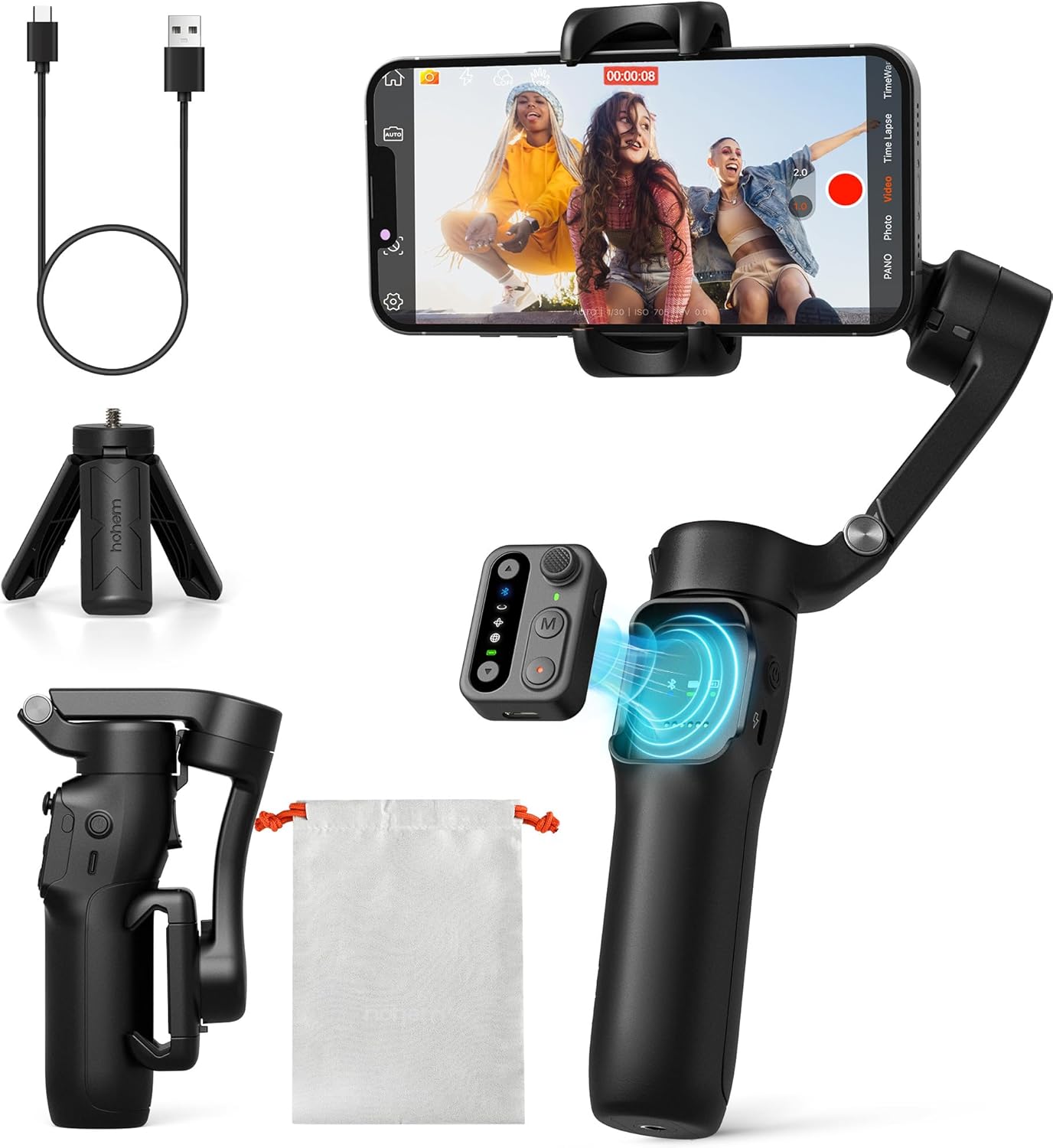
The Hohem iSteady X3 SE is a compact, lightweight 3-axis gimbal stabilizer designed for iPhone and Android users who want stable, professional-looking video without spending a fortune. It features a detachable magnetic remote, long battery life, and a foldable design that fits easily into a bag or even a large pocket. With advanced stabilization and integration with the Hohem Joy app, it’s aimed at beginners and casual creators who want to boost their video quality for vlogs, travel, or social media.
In daily use, the iSteady X3 SE stands out for its simplicity and reliability. The remote is genuinely convenient for solo shooting and group photos, and the foldable build means I can bring it on spontaneous outings without extra hassle. The stabilization is noticeably better than shooting handheld, making it easier to get smooth, shake-free footage even when walking or moving quickly. For most basic recording scenarios, it makes the process feel less intimidating and more fun.
Pros:
- Detachable remote enables easy control from a distance
- Impressive stabilization, even during movement
- Extremely portable and lightweight; folds to pocket size
- Long 11-hour battery life for all-day use
- Seamless integration with the Hohem Joy app for creative modes
- Works with both iPhone and Android devices
Cons:
- Plastic build feels less premium than some alternatives
- Not ideal for heavy or professional camera setups
- Learning curve for full app features
My Practical Opinion
If you’re new to gimbals and want something straightforward and affordable, the Hohem iSteady X3 SE is a reassuring choice. It’s especially suited to those who film with their phone and want better results without carrying bulky equipment. Setup is quick, and the detachable remote is genuinely handy for group shots or solo creators. For beginners, the app’s creative features are a nice bonus once you get comfortable.
This gimbal is a great entry point if you’re looking to improve your video quality for social media, travel, or family events. My advice: spend a few minutes exploring the Hohem Joy app to get the most out of the creative modes. Overall, it removes a lot of the fuss from mobile videography—making it a smart buy for casual users.
| Best for | Why |
|---|---|
| First-time gimbal users | Simple setup, intuitive controls, and a gentle learning curve |
| Travelers and vloggers | Lightweight, folds up small, and lasts all day |
| Budget-conscious content creators | Affordable price with features normally found on pricier models |
| People filming events or groups | Detachable remote makes it easier to capture group moments from afar |
Dji Osmo Mobile 7p Gimbal
Best Budget Gimbal for Beginners who want easy, reliable stabilization without a steep learning curve.

The DJI Osmo Mobile 7P Gimbal is a compact smartphone stabilizer designed to help beginners and casual creators capture smooth, professional-looking videos. It integrates native tracking, a multifunctional module for audio and lighting, and a smart magnetic mount, making setup quick and straightforward for both iPhone and Android users.
In regular use, the Osmo Mobile 7P stands out for its simple unfolding design and automatic app integration. Attaching your phone feels seamless, and the built-in extension rod and tripod make it easy to switch from vlogging to wide selfies. You can start shooting almost immediately, and the included guides help you get good results even if you’re brand new to gimbals.
Pros:
- Intuitive setup with magnetic phone mount
- Solid 3-axis stabilization for smooth footage
- Native tracking works well for moving subjects
- Built-in extension rod and tripod add flexibility
- Quick launch and auto app pairing
- Helpful ShotGuides and easy editing via DJI Mimo
Cons:
- Limited advanced manual controls for pros
- Some features require using the DJI Mimo app
- Plastic build may not feel as premium as pricier models
Who Should Choose This
If you’re just getting started with smartphone video or want a simple stabilizer you can trust, the Osmo Mobile 7P is a safe choice. It’s great for anyone who values quick setup and reliable performance over technical complexity. You won’t need to fuss with settings—just mount your phone, unfold, and start shooting.
My tip: Use the built-in extension rod to experiment with angles and group shots. Peace of mind comes from knowing that the stabilization just works, even if you’ve never used a gimbal before.
If you prefer a plug-and-play, user-friendly experience, this is likely the right pick for you.
| Best for | Why |
|---|---|
| Beginners | Easiest setup and user guidance |
| Mobile vloggers | Fast transitions between handheld and tripod shots |
| Travelers | Lightweight and portable with all-in-one features |
| Budget buyers | Affordable way to improve phone video quality |
Crxythmenon 4k Pocket Gimbal Camera
A smart pick for the Best Budget Gimbal for Beginners—combining portability, 4K video, and face-tracking in a single easy-to-use pocket camera.

The Crxythmenon 4K Pocket Gimbal Camera is a lightweight, compact device designed for creators who want professional-looking video and sharp photos without carrying bulky gear. It offers 4K video recording, a 330° gimbal lens for stabilization, and a 75MP photo option in an easy-to-carry form factor. The camera features smart face tracking and instant WiFi connectivity, making it a versatile choice for vlogging, everyday shooting, or casual content creation.
In daily use, this camera stands out for its reliability and simplicity. You can slip it into your pocket or bag, pull it out for spontaneous shooting, and trust that the automatic face tracking and gimbal will keep your footage stable and focused—even while walking or moving. Sharing is simple with built-in WiFi, and you can quickly transfer and post videos without extra cables or complicated steps. It’s a practical option for beginners who want consistent results without a steep learning curve.
- Extremely compact and portable for travel or daily use
- 330° gimbal stabilization keeps video smooth and steady
- Smart auto face tracking for hands-free vlogging
- Easy WiFi sharing—no cables required
- High-resolution 75MP photo option
- Beginner-friendly setup and controls
- Versatile for video, streaming, or time-lapse
- Limited manual controls for advanced users
- Battery life may not suit long shooting days
- Not ideal for rugged or extreme environments
My Honest Take
This camera is best for beginners who want stable, quality video without fussing over settings or carrying heavy gear. Right out of the box, it’s straightforward to set up and start using, so there’s little barrier to just grabbing it and filming. The automatic tracking and WiFi uploads mean you can focus more on telling your story and less on technical details.
If you’re new to vlogging or content creation, you’ll appreciate how it keeps things simple while still delivering sharp, steady footage. My tip: take a few minutes to get comfortable with the face tracking—it really helps when you’re filming solo. If you want something pocket-sized and reliable, this will make documenting your day much easier.
I like how it balances user-friendliness with features that actually matter for creators starting out.
| Best for | Why |
|---|---|
| Beginner vloggers | Simple controls, automatic tracking, ready to use out of the box |
| Travel and lifestyle creators | Ultra-compact and easy to carry anywhere |
| Solo content creators | Face tracking and gimbal keep footage sharp without help |
| Quick social media uploads | WiFi sharing for instant posting and editing |
Aochuan Smart Xe 3-axis Phone Gimbal
This is my pick for Best Budget Gimbal for Beginners thanks to its easy setup, intuitive controls, and reliable stabilization for smartphone videography.

The AOCHUAN Smart XE is a compact, foldable 3-axis gimbal designed for smartphones—making it ideal for those new to mobile videography. It’s lightweight and portable, yet strong enough to carry larger phones, and includes a focus wheel and zoom slider for more creative control. You can easily switch between horizontal and vertical modes with a single button, which is perfect for creating content on TikTok or YouTube Shorts.
In everyday use, the Smart XE stands out for its reliable stabilization and intuitive app controls. The battery lasts up to 10 hours, so I never worry about running out of power during a day of shooting or vlogging. The AI face tracking and anti-shake features are easy to set up—even for a beginner—and the included tripod adds versatility. It’s a straightforward way to get smooth, professional-looking footage without a steep learning curve.
Pros:
- Effortless one-click switching between portrait and landscape modes
- Lightweight, foldable design—easy to carry anywhere
- 10-hour battery for all-day filming
- Intuitive app with beginner-friendly tutorials
- AI face tracking and advanced anti-shake algorithm
- Compatible with most iPhones and Android smartphones
- Tripod included for added shooting flexibility
Cons:
- Phone not included—requires your own device
- Some advanced features may require app learning
- Payload limited to larger smartphones (max 250g)
My Honest Take
This gimbal is a smart buy for anyone just starting out in video creation or social media content. Its simple design and clear instructions mean you can focus on filming rather than fiddling with settings. Beginners will find the app tutorials and one-click mode changes especially helpful, while the long battery life makes it practical for travel, vlogging, or all-day events.
If you’re new to gimbals, start with the basic stabilization features and experiment with the focus wheel as you get comfortable. It’s reassuring to know the device is sturdy and won’t let your phone slip. I found that even after a full day of use, it stayed reliable and consistent.
For anyone wanting smooth, professional-looking video without a big investment or technical hurdles, this is a great place to start.
| Best for | Why |
|---|---|
| Beginner video creators | Intuitive controls and tutorials make learning easy |
| Vloggers and travelers | Portable, lightweight, and all-day battery life |
| Social media content makers | Quick switching for TikTok, YouTube Shorts, and IGTV |
| Anyone needing steady phone video | Effective anti-shake and face tracking for smooth results |
Comitok L7c Pro Foldable Phone Gimbal
If you’re searching for the Best Budget Gimbal for Beginners, the COMITOK L7C Pro stands out for its reliable stabilization and easy setup.

The COMITOK L7C Pro is a foldable, lightweight gimbal stabilizer designed for iPhone and Android users who want smooth video without spending much. Its 3-axis stabilization ensures your recordings are steady, whether you’re capturing family moments or vlogging on the go. With advanced AI tracking and gesture controls, it’s easy to keep subjects perfectly centered, making it ideal for beginners who don’t want to fuss with manual adjustments.
Using the L7C Pro day-to-day is straightforward. It requires no leveling, so you can unfold it, pop your phone in, and start recording within seconds. The device is compact and portable, fitting in most bags, and the battery lasts all day. I find its consistent performance reassuring, and the wide compatibility means you won’t need to upgrade your phone just to use it. The app unlocks creative modes like time lapse and dolly zoom, which are fun to experiment with once you’re comfortable.
Pros:
- True 3-axis stabilization for smooth footage
- Easy setup—no leveling or complex adjustments needed
- Lightweight and folds down for portability
- AI-powered face and object tracking via app
- Long battery life with quick charging
- Compatible with most iPhones and Android phones under 7″
- Gesture controls simplify operation
- Multiple creative modes available in the app
Cons:
- App required for advanced functions
- May not suit larger phones or heavy setups
- Plastic build feels less premium than pricier models
My Honest Take
If you’re new to video recording or want a budget-friendly way to upgrade your footage, the COMITOK L7C Pro is a stress-free pick. It’s built for beginners—no need to worry about balancing or fiddly adjustments. Just unfold, attach your phone, and start filming. Experienced users may find it a bit basic, but for casual creators, it’s reliable and straightforward.
The lightweight design makes it easy to carry everywhere, and the battery keeps up with a full day of shooting. My practical tip: download the Gimbal Pro app early and try the tracking features—they make solo filming far easier. For peace of mind, it’s good to know the device charges quickly and won’t leave you stranded mid-recording.
| Best for | Why |
|---|---|
| Beginner videographers | Simple setup and intuitive controls |
| Travel vloggers | Compact, portable, and long battery life |
| Budget-conscious buyers | Affordable price with essential features |
| Casual smartphone users | Works with most popular phones and is easy to use |
Funsnap Cm8 3-axis Phone Gimbal
Best Budget Gimbal for Beginners who want easy, shake-free smartphone video without the learning curve or high price tag.
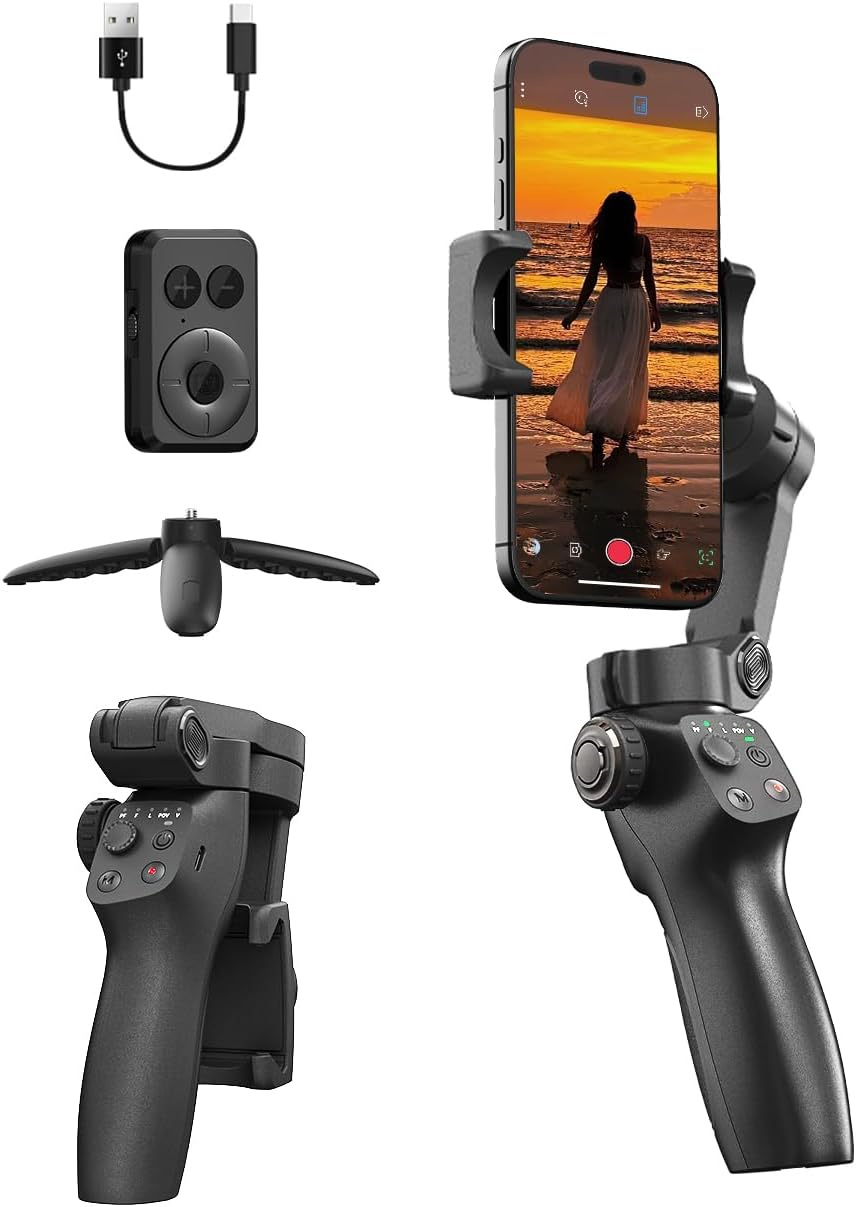
The FUNSNAP CM8 3-Axis Phone Gimbal is a practical stabilizer built for anyone looking to upgrade their smartphone videos without spending a fortune. It supports both iPhone and most Android models, giving you smooth, shake-free footage whether you’re filming family gatherings, outdoor adventures, or quick social media clips. With its remote control and single-click portrait/landscape switch, the CM8 makes capturing content straightforward, even if you’ve never used a gimbal before.
In everyday use, this gimbal is reliable and beginner-friendly. The controls are intuitive, and the remote lets you start recording or switch modes from a distance—great for solo creators or group shots. Its 12-hour battery life means you can film all day without worrying about recharging, and the solid payload capacity gives you flexibility to use a variety of phones without fuss. If you want consistent, steady video with minimal setup, the CM8 is easy to pick up and just works.
Pros:
- Very affordable for a 3-axis gimbal
- Remote control works up to 32 feet away
- One-click switch for portrait or landscape filming
- Long 12-hour battery life on a quick charge
- Compatible with most smartphones, not brand-limited
- Good for solo creators and group shots
Cons:
- Limited payload—won’t fit extra-large phones with heavy cases
- Basic controls—less customization for advanced users
- Plastic build feels light rather than premium
Who This Is Best For
If you’re new to video stabilizers, the CM8 is a gentle introduction—it’s simple to set up, and you won’t need hours of practice to get smooth video. Beginners and casual creators will appreciate how quickly you can switch from shooting TikToks to landscape vlogs with just one button. Once you get it, you can be up and recording steady shots within minutes. My tip: keep the remote handy for hands-free starts when filming yourself or group moments. There’s comfort knowing the battery will last all day, and the straightforward controls mean less fiddling and more filming. If you just want your footage to look steady and sharp, without the stress, this gimbal covers the basics well.
| Best for | Why |
|---|---|
| First-time gimbal users | Easy setup, forgiving controls, minimal learning curve |
| Budget-conscious content creators | Low price with solid stabilization features |
| Social media video makers | Quickly switches between portrait and landscape for TikTok or YouTube Shorts |
| Solo travelers and vloggers | Remote control and all-day battery make filming easy and flexible |
Hohem Isteady Mobile Plus Gimbal
This is our pick for Best Budget Gimbal for Beginners thanks to its simple setup and features aimed at first-time users.

The Hohem iSteady Mobile Plus is a smartphone gimbal designed to help you capture smooth, stable videos without complicated controls. It stands out with an ultra-wide-angle mode that prevents the gimbal’s motors from blocking your phone’s camera, especially handy for wide shots or vlogging. Its boosted motor torque also means it can handle even larger phones like the iPhone 15 Pro Max, so you don’t have to worry about compatibility.
In everyday use, the iSteady Mobile Plus feels reliable and easy to operate. You can access advanced shooting modes and creative effects with just a few taps in the Hohem Joy app, which makes experimenting fun even if you’re new to gimbals. The long battery life means you can film for hours without hunting for a charger, and you can even use the gimbal as a power bank in a pinch. For beginners, the straightforward interface and helpful presets make it less intimidating to get started.
Pros:
- Ultra-wide-angle mode avoids motor interference in your shots
- Handles large smartphones with ease
- Simple app with one-tap creative features
- Long battery life—up to 13 hours
- Acts as a power bank for your phone
- Supports advanced effects like 360° rotation and timelapse
Cons:
- Plastic build feels less premium than pricier models
- Some features require using the Hohem app
- Not ideal for action-heavy or professional cinematography
My Experience With This:
The Hohem iSteady Mobile Plus is a solid pick for new users or anyone on a budget who wants reliable stabilization for their phone. Beginners will appreciate not having to fuss with settings, and the creative presets in the app keep things approachable. If you’ve never used a gimbal before, expect a short learning curve, but once you’re up and running it’s mostly point, shoot, and go.
One tip: make sure your phone is securely balanced before starting, as this helps both performance and battery life. For peace of mind, it’s nice that the gimbal doubles as a power bank—especially on long shooting days. I’d recommend it for casual travel, social media, or anyone curious about stepping up their video quality without overspending.
| Best for | Why |
|---|---|
| Beginners on a budget | Easy to set up and use, affordable price |
| Travel vloggers | Lightweight, long battery, power bank feature |
| Casual video creators | Creative modes and effects are easy to access |
| Anyone with a large smartphone | Supports larger devices without balance issues |
Dji Om 4 Smartphone Gimbal
An excellent Best Budget Gimbal for Beginners, combining smooth stabilization with easy-to-use features for first-time vloggers and creators.

The DJI OM 4 Smartphone Gimbal is a compact, handheld stabilizer designed to help you capture smooth, shake-free videos with your phone. Thanks to its magnetic clamp, it’s quick and simple to snap your device on and off, making it ideal for vlogging, live streaming, or shooting casual videos. The three-axis motor keeps footage steady, while built-in features like gesture controls and ActiveTrack make creating content intuitive, even if you’re brand new to using a gimbal.
In everyday use, the OM 4 stands out for its user-friendly approach. Setting it up takes just a few minutes, and the controls are straightforward enough for anyone to get started without much fuss. I found it reliable whether shooting indoors or outside, and the gesture control is a surprisingly handy way to take group shots or start recording without touching your phone. The stabilizer’s balance between simplicity and functionality makes it easy to keep using, even if you’re not a tech expert.
Pros:
- Effortless magnetic phone attachment
- Consistently smooth stabilization, even with added phone lenses
- Gesture controls for hands-free operation
- ActiveTrack 3.0 follows people and pets with high accuracy
- Easy to set up and learn for complete beginners
- Compact, portable design with included tripod
Cons:
- Requires charging between sessions
- Some features need DJI’s app to access
- Not designed for heavy or pro camera rigs
Why I Recommend This
If you’re just starting out with smartphone video or want to improve your social media content, the DJI OM 4 is a solid choice. It’s approachable for beginners, with simple controls and features that help you focus more on your shots than on the tech. Most people find it easy to pick up and use right away.
This gimbal removes the intimidation factor from stabilizers—especially if you’ve never used one before. My tip: take a few minutes to explore the gesture controls and tracking modes; they add a lot of convenience. For casual creators, families, or anyone wanting stable footage without a learning curve, this model is a safe and practical pick.
| Best for | Why |
|---|---|
| Beginners & First-Time Users | Easy setup and intuitive controls |
| Vloggers & Social Media Creators | Stable, professional-looking footage with minimal effort |
| Families & Travelers | Portable design and quick magnetic mounting |
| Pet or Child Filming | Accurate subject tracking for moving shots |
How To Choose Best Budget Gimbal For Beginners For Your Needs
Choosing your first budget gimbal is about finding a model that supports your filming needs without overwhelming you with complexity or high costs.
- Is the gimbal lightweight enough for extended handheld use?
- Does it support the size and weight of your camera or smartphone?
- Are the controls intuitive for a beginner to operate?
- Does the battery life fit your typical shooting sessions?
- Is it easy to set up and balance?
- Does it offer basic stabilization modes you actually need?
For more details, check out the FAQs below.
Faqs Of Best Budget Gimbal For Beginners
What safety features should I look for in a budget gimbal?
Look for stable locking systems and strong materials. These prevent the gimbal from slipping or breaking during use.
How do I choose the right size gimbal for my smartphone?
Pick a gimbal that fits your phone’s width and weight. Most budget gimbals list supported sizes in their product details.
How often should I clean my gimbal?
Clean your gimbal after each use with a soft cloth. This helps keep the device working well and removes dust or dirt.
Is daily use safe for a budget gimbal?
Yes, daily use is safe if you follow the instructions. Avoid overloading it and handle with care to make it last longer.
Can a beginner easily operate a budget gimbal?
Most budget gimbals are simple to use and have easy controls. Beginners can start filming with little setup or training.
How do I store my gimbal to keep it safe?
Store your gimbal in a dry, cool place. Use a carrying case to protect it from bumps and dust when not in use.
Final Verdict: Best Budget Gimbal For Beginners For Most People
Finding the right budget gimbal as a beginner means weighing what features matter most for your shooting style. Consider the balance between stabilization performance, portability, and user-friendly controls that fit your current needs.
It’s important to think about which options will grow with your skills and support your creative process. A gimbal that feels intuitive and reliable will encourage you to film more and experiment with confidence.
Choose the one that feels like a trusted companion for your journey.
