
When you’re choosing an external SSD, speed and compatibility are probably at the top of your list. But how do you decide between USB4 and USB 3.2?
You might think all USB connections are pretty much the same, but there’s a big difference that can affect how fast your files transfer and how smoothly your devices work together. If you want to get the most out of your external SSD, understanding these two standards is key.
Keep reading, and you’ll discover which one suits your needs best—and why it matters for your everyday tech use.
Usb4 Technology
USB4 technology represents the latest development in USB standards. It brings faster speeds and smarter connections to external SSDs. USB4 improves data transfer efficiency and power management. This technology aims to simplify connections across devices and enhance overall performance.
Data Transfer Rates
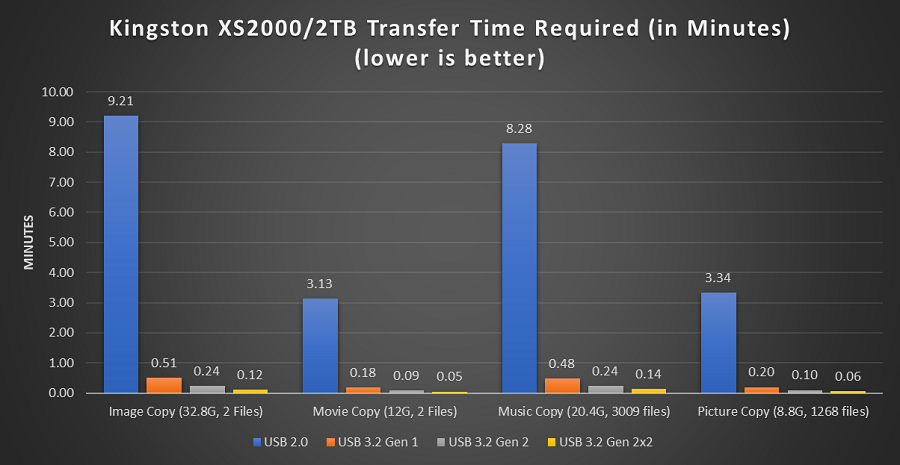
USB4 supports transfer speeds up to 40 Gbps. This is twice as fast as USB 3.2 Gen 2×2, which tops at 20 Gbps. Higher speeds mean quicker file transfers and less waiting time. Large files like videos and backups move much faster. USB4 helps external SSDs perform at their best.
Power Delivery Features
USB4 offers improved power delivery options. It can deliver up to 100 watts of power to connected devices. This feature allows faster charging and powers more demanding hardware. External SSDs benefit from stable power, ensuring consistent performance. USB4 also supports power negotiation for efficient energy use.
Compatibility And Ports
USB4 uses the USB-C connector type for all connections. This design simplifies device compatibility and cable use. It works with Thunderbolt 3 and older USB standards. Devices automatically adjust to the best available protocol. USB4 ports enable a single cable for data, power, and video.
Credit: www.kingston.com
Usb 3.2 Technology
USB 3.2 technology brought a new wave of improvements to external SSDs. It enhanced data transfer speeds and power delivery. This technology helped external drives perform faster and more efficiently. USB 3.2 remains widely used in many devices and accessories today.
Speed Variants
USB 3.2 offers multiple speed options. The original USB 3.2 Gen 1 provides speeds up to 5 Gbps. USB 3.2 Gen 2 doubles that speed to 10 Gbps. The fastest, USB 3.2 Gen 2×2, reaches 20 Gbps. These speeds allow quicker file transfers and better performance with external SSDs.
Power Capabilities
USB 3.2 supports improved power delivery. It can provide up to 100 watts of power. This is enough to charge laptops and power external devices. External SSDs benefit by receiving stable and adequate power during use. This helps maintain consistent speed and reliability.
Device Compatibility
USB 3.2 works with many existing devices. It supports backward compatibility with USB 3.1 and USB 2.0. This means older devices can still connect and function. Users can plug external SSDs into laptops, desktops, and more without issues. This compatibility makes USB 3.2 a practical choice for many users.
External Ssd Basics
External SSDs are portable storage devices that use solid-state technology. They connect to computers via USB or other ports. These drives store data on flash memory chips. External SSDs offer faster speeds than traditional drives. They are compact and easy to carry. Understanding their basics helps you choose the right one for your needs.
How Ssds Work
SSDs store data using flash memory chips instead of spinning disks. They access data electronically, which makes them faster. No moving parts mean less noise and lower chance of failure. Data is saved in cells that retain information without power. This design allows quick reading and writing speeds.
Benefits Over Hdds
SSDs are much faster than hard drives. They start up computers and open files quickly. They are more durable because they lack moving parts. SSDs use less power, helping laptops last longer on battery. They are quieter and produce less heat compared to HDDs.
Typical Use Cases
External SSDs suit users needing fast data access on the go. Photographers and videographers use them to store large files. Gamers prefer SSDs for faster game loading times. They also work well for backing up important data. Professionals use them to transfer files quickly between devices.
Performance Factors
Choosing between USB4 and USB 3.2 external SSDs requires understanding their compatibility. Compatibility affects how well the SSD works with different devices. This section explains key points to consider before buying.
Backward Compatibility
USB4 supports older USB versions, including USB 3.2 and USB 2.0. This means newer SSDs with USB4 can connect to older ports. The speed will match the slowest device in the chain. USB 3.2 is also backward compatible but only with previous USB 3.x versions. Using older cables may limit the SSD’s performance. Always check if your device supports the USB version of your SSD.
Cross-platform Support
Both USB4 and USB 3.2 external SSDs work with different operating systems. Windows, macOS, and Linux all support these standards. USB4 offers better performance on newer Macs and PCs with Thunderbolt 3 ports. USB 3.2 is widely supported on most computers and laptops. Make sure your device’s operating system supports the SSD’s USB version for smooth use.
Speed Comparison
Choosing the right external SSD depends on your specific needs. USB4 and USB 3.2 offer different speeds and features. Understanding these will help you pick the best option for your tasks. Consider what you use the SSD for most. That guides your decision effectively.
Work And Productivity Needs
For work tasks, fast data transfer is key. USB4 provides higher speeds than USB 3.2. This helps when moving large files or using virtual machines. USB 3.2 still works well for basic tasks like document storage. Choose USB4 if your work involves heavy file handling.
Gaming And Media Editing
Gamers and editors need quick load times and smooth performance. USB4’s faster speeds reduce waiting times for game assets and video files. USB 3.2 may cause delays during heavy editing sessions. USB4 supports better data flow for high-resolution media work.
Future-proofing Your Setup
Technology evolves fast. USB4 offers better compatibility with upcoming devices. Investing in USB4 means your SSD stays relevant longer. USB 3.2 is still common but may limit future upgrades. Choosing USB4 helps avoid frequent replacements.

Credit: www.kingston.com
Frequently Asked Questions
Which Is Faster, Ssd Or Usb?
SSDs are generally faster than USB drives. SSDs use advanced technology and faster connections for quicker data transfer. USB speeds vary by version, but even USB 3. 2 often lags behind SSDs. For speed, choose an SSD over a USB drive.
Is Usb 3.2 Worth Upgrading To?
USB 3. 2 offers faster data transfer speeds and improved performance over older versions. Upgrade if you need quicker file transfers and better device compatibility.
Is Usb4 As Good As Thunderbolt?
USB4 matches Thunderbolt 3 in speed, offering up to 40 Gbps. Both support data, video, and power delivery efficiently.
Is Usb 3.2 Gen 2×2 The Same As Usb4?
USB 3. 2 Gen 2×2 and USB4 are not the same. USB 3. 2 Gen 2×2 offers up to 20 Gbps speed, while USB4 supports up to 40 Gbps and more features.
Conclusion
Choosing between USB4 and USB 3. 2 for an external SSD depends on your needs. USB4 offers faster speeds and better future-proofing. USB 3. 2 still works well for everyday tasks and older devices. Consider your budget and device compatibility before deciding.
Both standards improve data transfer compared to older USB versions. Remember, the right choice helps you save time and avoid frustration. Keep your devices and cables in mind to get the best performance.
