
When it comes to making your smart home truly smart, understanding the difference between routines and scenes is key. You might wonder: which one should you use to simplify your daily life?
Are they just different names for the same thing, or do they serve unique purposes? Knowing how routines and scenes work can help you unlock the full potential of your smart devices, saving you time and effort every day. You’ll discover how to choose the right option for your needs, so your home responds exactly the way you want—effortlessly and intelligently.
Keep reading to transform your smart home experience like never before.
Smart Home Basics
Smart homes use technology to make life easier and more comfortable. Devices like lights, thermostats, and locks connect and work together. This connection allows control from one place, like a phone app or voice commands. Two common ways to manage these devices are routines and scenes.
What Are Routines
Routines are sets of actions that happen automatically based on triggers. For example, a morning routine can turn on the lights, start the coffee maker, and adjust the thermostat. These actions run in a specific order without needing your input each time.
Triggers can be a time of day, your location, or a device status change. Routines help save time by automating daily tasks. They make smart homes more responsive to your lifestyle.
What Are Scenes
Scenes control multiple devices at once with a single command. For example, a “movie night” scene can dim the lights, close the curtains, and turn on the TV. Scenes set the mood or prepare your home for specific activities quickly.
Unlike routines, scenes do not run automatically. You activate them manually through an app or voice command. Scenes create a convenient shortcut to adjust many settings instantly.
Key Differences
Understanding the key differences between routines and scenes is essential for smart home users. Both help control devices but serve different purposes. Knowing these differences helps you choose the right setup for your needs.
Control And Automation
Routines automate multiple actions in a sequence. They can turn devices on or off, adjust settings, and run tasks automatically. Scenes, by contrast, set devices to a specific state all at once. They do not automate actions over time but create a snapshot of device settings you want to recall quickly.
Trigger Types
Routines start based on triggers like time, location, or device status. For example, a routine might run at sunrise or when you leave home. Scenes usually activate manually through an app or voice command. They do not respond to external triggers but serve as quick presets to change your environment instantly.
Customization Options
Routines offer more detailed customization. You can add delays, conditions, and multiple steps to tailor automation. Scenes are simpler, focusing on setting device states like lights and blinds. They allow fewer options but provide fast control over your smart home atmosphere.
Advantages Of Routines
Routines offer distinct advantages in smart home systems. They allow users to automate complex tasks easily. This improves daily life by saving time and effort. Routines can adapt to different needs and situations.
Automation Flexibility
Routines let you combine many actions into one command. For example, you can turn off lights, lock doors, and adjust the thermostat at once. This flexibility helps create personalized experiences. You control what devices do and when.
Conditional Actions
Routines support conditions to trigger actions only when needed. Lights can turn on if it is dark outside. Heating can start if the temperature drops below a set point. This saves energy and makes the system smarter.
Scheduling Features
Routines can run on a set schedule automatically. You can set a routine to start every morning or at bedtime. This keeps your home comfortable without manual input. Scheduling helps maintain a smooth daily rhythm.
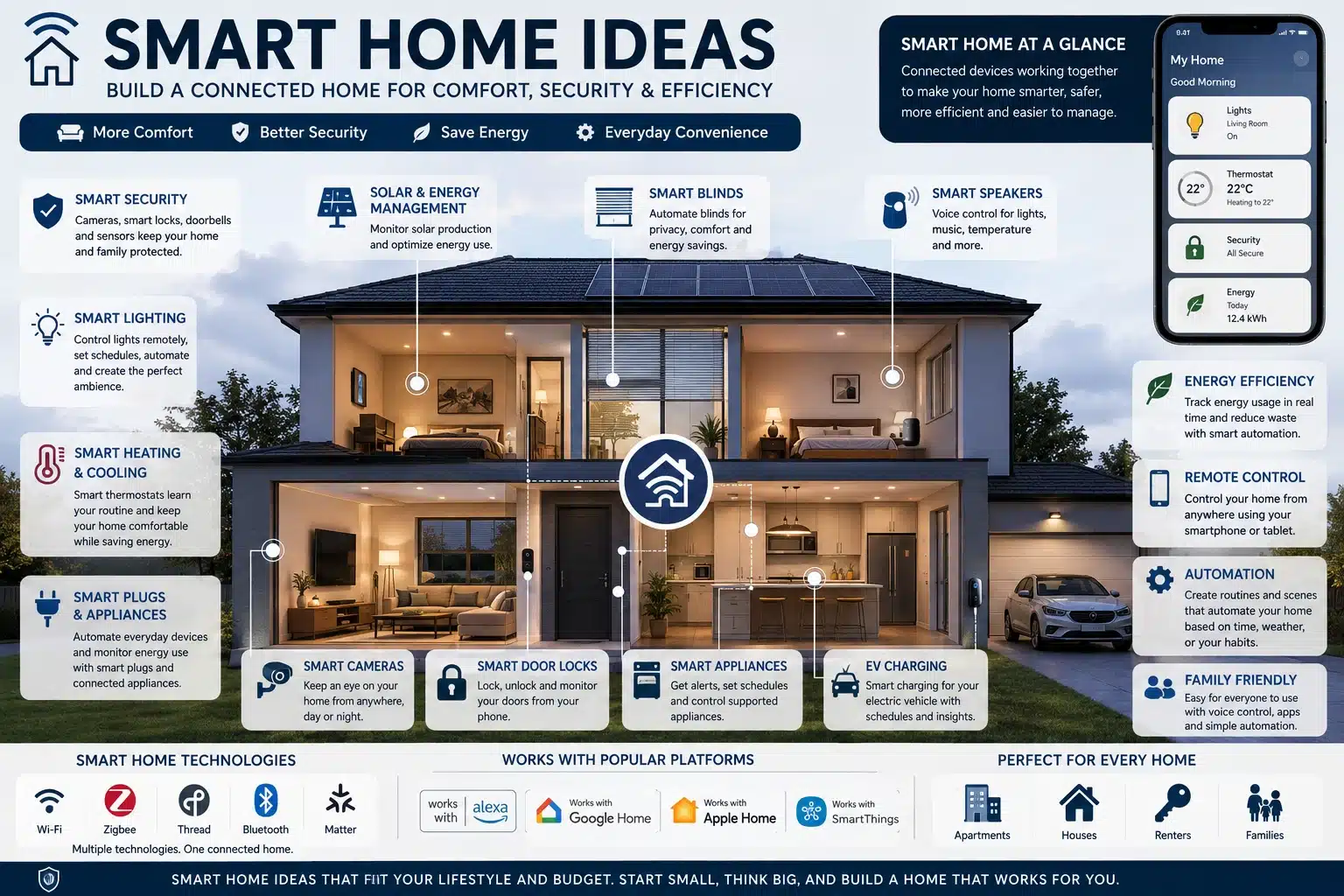
Credit: homezurra.com
Advantages Of Scenes
Scenes in smart home systems offer clear benefits. They let users control many devices with one simple command. Scenes improve convenience and save time daily.
Instead of adjusting each device separately, a scene groups actions into one. This makes managing your smart home easier and faster. Scenes also help keep your home environment consistent.
Instant Multi-device Control
Scenes activate multiple devices at the same time. Lights, thermostats, and blinds can all change together. This gives quick, coordinated control for any situation.
You can switch on a “Movie Night” scene to dim lights and lower shades immediately. This instant control enhances comfort and creates the right mood fast.
Simplified Setup
Setting up scenes is simple and user-friendly. You select devices and define their states once. Then, a single command triggers all actions simultaneously.
This reduces the need for complex programming or multiple steps. Many smart home apps provide easy drag-and-drop or checklist options to build scenes.
Use Case Examples
Common scenes include “Good Morning,” which turns on lights and starts the coffee maker. “Leaving Home” can switch off all devices and lock doors.
Scenes also work for security, like activating alarms and cameras with one tap. They fit many routines, making daily life smoother and more efficient.
Limitations To Consider
Smart home systems offer great convenience but come with some limits. Understanding these helps set realistic expectations. Both routines and scenes have their own challenges that can affect your smart home experience.
Routines’ Complexity
Routines can become complicated fast. They often involve many steps and conditions. Managing these can confuse users new to smart home technology. Complex routines may also lead to errors or unintended actions. Keeping routines simple improves reliability and ease of use.
Scenes’ Feature Gaps
Scenes usually control devices with simple commands. They lack advanced options like delayed actions or automatic turn-off. This limits their flexibility compared to routines. Scenes work well for basic setups but may fall short for more detailed control. Knowing these gaps helps choose the right tool for your needs.
Compatibility Issues
Not all devices support every routine or scene function. Different brands use different protocols and software. This can cause some commands to fail or devices to ignore actions. Checking device compatibility before setting up saves frustration. It ensures smoother smart home operation across your devices.
Creating Effective Routines
Creating effective routines in smart home systems allows you to automate daily tasks and improve convenience. A well-designed routine combines multiple device actions into a single command. This saves time and enhances your home’s comfort and security. Simple steps can help you set up routines that work smoothly and meet your needs.
Step-by-step Setup
Start by choosing the smart home app linked to your devices. Select the option to create a new routine. Give your routine a clear, easy-to-remember name. Add the actions you want, like turning on lights or adjusting the thermostat. Arrange actions in the order they should run. Save your routine and test it to ensure it works properly.
Incorporating Delays
Use delays to space out actions within your routine. For example, turn on lights first, then start music after a few seconds. Delays prevent devices from switching simultaneously, avoiding power surges. They also create a natural flow, making the routine feel smoother. Adjust delay times based on your preferences and device response speed.
Best Practices
Keep routines simple and focused on specific tasks. Avoid adding too many actions that may cause confusion or errors. Regularly update routines to match changes in your daily habits. Test routines after any change to confirm they work as intended. Use clear names and descriptions to identify each routine easily.
Designing Practical Scenes
Designing practical scenes in smart home systems helps simplify daily tasks. Scenes let you control multiple devices together with one command. They make your home more comfortable and efficient.
Planning the right scenes ensures your smart home works smoothly. Focus on grouping devices logically, setting clear triggers, and choosing common scenes that fit your lifestyle.
Grouping Devices
Group devices that work well together. For example, put all living room lights in one group. Add smart plugs and speakers to the same group if needed. Grouping devices saves time and reduces confusion.
Think about rooms or activities when grouping. Kitchen devices could include lights, coffee makers, and fans. This way, one scene can control everything you need for cooking or relaxing.
Triggering Scenes
Set clear triggers to activate scenes easily. Triggers can be time-based, like turning on lights at sunset. They can also be manual, such as pressing a button or using a voice command.
Use motion sensors or door sensors as triggers for safety scenes. For instance, lights can turn on when you enter a room. Triggers help your smart home respond quickly and correctly.
Common Scene Ideas
Start with simple scenes like “Good Morning” or “Movie Time.” Good Morning can turn on lights and start the coffee maker. Movie Time can dim lights and turn on the TV.
Other ideas include “Away” to turn off all devices or “Dinner” to set dining room lights and play soft music. Choose scenes that match your daily routines and preferences.
Popular Platforms Comparison
Smart home systems offer various ways to control devices automatically. Two common methods are routines and scenes. Each platform handles these features differently. This section compares popular smart home platforms to help you understand their approach.
Apple Homekit
HomeKit uses scenes and automations to manage devices. Scenes let you set a group of actions to run with one tap. Automations trigger these scenes based on conditions like time or location. The system focuses on simplicity and privacy. It works well with Apple devices and supports Siri voice control.
Google Home
Google Home uses routines to automate tasks. A routine can control multiple devices and services at once. It can start with a voice command or a schedule. Google routines integrate deeply with Google Assistant. This platform is flexible and supports many third-party devices. It aims to simplify daily tasks with easy setup.
Samsung Smartthings
SmartThings offers both scenes and automations. Scenes allow users to control several devices together. Automations trigger actions based on events or conditions. SmartThings supports a wide range of smart devices. It provides advanced customization for tech-savvy users. The platform works well with many brands, adding great versatility.
Maximizing Smart Home Control
Maximizing control over your smart home means using every tool smartly. Routines and scenes each offer unique ways to manage devices. Combining them enhances convenience and efficiency. Smart control fits your daily life better. It saves time and simplifies tasks.
Combining Routines And Scenes
Routines set a series of actions triggered by time or events. Scenes group device settings you activate together. Use scenes inside routines to trigger multiple settings at once. For example, a “Movie Night” routine can start a scene that dims lights and closes curtains. This mix creates smooth, automatic experiences without manual steps.
Using Voice Commands
Voice assistants make smart home control hands-free. Assign simple phrases to routines or scenes for easy access. Say “Good morning” to start your wake-up routine with lights and coffee. Clear commands reduce confusion and speed up actions. Voice control adds comfort and accessibility for everyone.
Security And Privacy Tips
Keep your smart home safe by using strong passwords on devices and apps. Limit access to trusted family members only. Regularly update firmware to fix security holes. Disable voice history if you worry about privacy. Secure your network with encryption and a guest Wi-Fi for visitors. These steps protect your home and data.
Frequently Asked Questions
What Is The Difference Between Scenes And Automations In Home Assistant?
Scenes in Home Assistant set devices to specific states instantly. Automations trigger actions based on conditions or events automatically.
What Is The Difference Between Scenes And Automations In Homekit?
Scenes in HomeKit control multiple devices instantly with one command. Automations trigger actions automatically based on conditions like time or location.
Are Google Home Routines Now Called Automations?
Google Home routines are now called automations. They allow users to trigger multiple smart actions automatically.
What Is The Difference Between Routines And Scenes?
Routines automate a sequence of actions based on triggers, while scenes set specific device states instantly. Routines respond to conditions like time or events. Scenes act as shortcuts to control multiple devices with one command, without triggers.
Conclusion
Routines and scenes each offer unique benefits for smart homes. Scenes provide quick, simple control of multiple devices at once. Routines automate tasks based on time or triggers, saving effort daily. Choosing the right option depends on your needs and lifestyle.
Both help create a smoother, more comfortable home experience. Experiment with each to see what fits best. Your smart home becomes smarter through thoughtful use of routines and scenes.
